Design
staging docs v0.14
Note
Hyperlinks in the text that follows are commonly used PyPSA terminology and link to a short definition in the project’s Glossary.
The Network is the overall container
The network is the overall container for all electrical system devices,
the data that defines them, and their connections and interactions.
A network is instantiated via the Python Class constructor pypsa.Network().
All devices belong to single component ‘group’ that allows definition of devices with similar
behavior and data structures. Hence, in this documentation, component is NOT a synonym for device.
When we reference component, or sometimes Component, or component class, we are referring to
a group (or groups) of devices. Each device must be assigned a unique name attribute to
allow its data to be retrieved from within its Component container.
All devices must belong to a Component class; components cannot exist without a Network; and therefore all data is held within the Network container. The Network is also the object on which calculations, such as power flow and optimal power flow, are performed.
Those data that are organized by component are accessed by two different labels. The Component’s label,
for which PyPSA adopts Python CapWords convention normally reserved for formal classes,
is used to access data that describes the structure of the component class, i.e. the Component’s metadata.
To access data that relates to the devices within a particular component class, PyPSA uses
the variable list_name, which is formatted in standard snake_case convention.
list_name can be thought of as “data for the list of devices within the Component class”.
Each component has a specific list_name and each list_name refers to devices in a single,
specific component class, i.e. 1-to-1 mapping between the two labelling designations.
A complete list of components is discussed in Network and components, but to provide a sense of Component label vs. list_name, here are some examples:
Component |
list_name |
|---|---|
Bus |
buses |
Generator |
generators |
Load |
loads |
Line |
lines |
Transformer |
transformers |
StorageUnit |
storage_units |
Note
Unlike Network objects, Components are not formal Python classes. The CapWords convention indicated in the table above, and that PyPSA applies, is intended to indicate a grouping, or quasi class-like usage only. In this documentaiton the capitalization of “component” itself is not significant; “component” and “Component” refer to the same thing. However, we will be clear when we need to indicate which specific string accessor must be used, or in what combination, to retrieve data, e.g. “Bus” or “buses”.
Buses are the fundamental network nodes
The bus is the fundamental node to which all loads, generators,
storage_units, lines, transformers, links, etc. attach.
You can attach as many devices – of as many different non-Bus component
classes – to a bus as you want.
A Bus device’s role is to enforce energy conservation for all other devices
feeding in and out of it (i.e. like Kirchhoff’s Current Law).
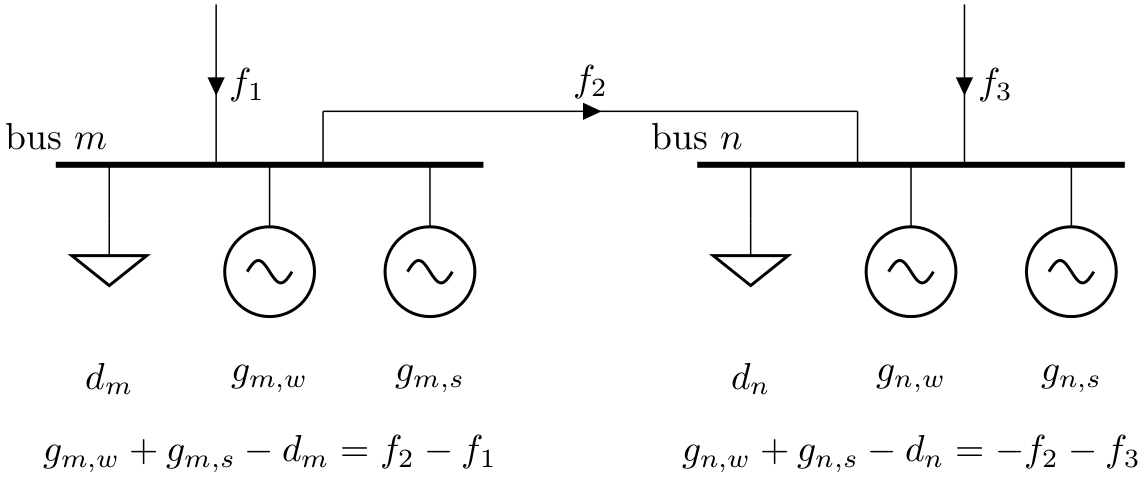
Energy flow in the model
Energy enters the network model (at a specific Bus-class device) from certain devices,
e.g. typically all generators, storage_units or stores with higher energy before than after the simulation,
and any devices defined with an efficiency greater than 1, e.g. heat pumps.
Energy leaves the model in other devices, e.g. typically all loads, storage_units or stores with higher
energy after than before the simulation, and in lines, links or other devices with efficiency less than 1.
Data is stored in pandas DataFrames
To enable efficient calculations on the different dimensions of the
data, data is stored in memory using pandas.DataFrames, accessible
either directly as an attribute of the Network object, or within certain
nested dictionary constructs that are themselves attributes of an instantiated network object.
Other power system toolboxes use databases for data storage. However, given
modern RAM availability and speed considerations, pandas.DataFrames
provide advantages in simplicity, interoperability with extensions to PyPSA,
and general ease of access for most researchers and analysts in the field.
To see full details on what data are stored for each component, see Network and components.
Static component data: network.{list_name}
For each Component, e.g. Line, Transformer, Generator, etc.,
the static data defining all devices within the component class
are stored in a pandas.DataFrame accessible as an attribute of the Network object via its
list_name. All components and their list_names are defined in the
components.csv file in the main package directory.
For example, all static data for devices in the Bus class is stored in network.buses.
In this pandas.DataFrame the index corresponds to the unique name attribute
for each device, while the columns correspond to the Component class’s static attributes.
Such data might include impedance, nominal capacity rating, and the buses to which a device might be attached,
values that a given network model would likely presume are constant for a device over time.
As an example, network.buses.v_nom gives the nominal voltages of each Bus device.
Whether an attribute is static (or not) is defined by the appropriate component-level csv file
in the component_attrs sub-directory; the only attributes that will NOT have a static
designation are those marked “series” in the type column.
See Components Schema: network.components dictionary for further details.
Time-varying data: network.{list_name}_t
Some quantities, e.g. generator p_set (generator active power set point),
generator p (generator calculated active power), line p0 (line active power at bus0),
and line p1 (line active power at bus1), may vary over time. PyPSA offers the possibility
to store different values of these attributes for the different snapshots assigned to network.snapshots
Which attributes, for a given component class, have the option (or requirement) to be available
as a time-varying quantity is defined in the relevant csv in the component_attrs sub-directory.
Any attribute with type defined as "series" or "static or series" will have this capability and the
datatype for its values will be automatically set to Python float.
All time-varying, a.k.a time-series, attributes are stored in a dictionary of pandas.DataFrames based on
the list_name concatenated with _t, e.g. network.buses_t will return a Python dictionary.
The time-varying attribute labels are then the keys to this dictionary and return a pandas.DataFrame
that holds all values over snapshots for those devices in the list_name component
class for which time-varying data has been defined for this attribute.
For example, the set points for the per unit voltage magnitude at each bus for each snapshot can be found in
the DataFrame retreived from network.buses_t["v_mag_pu_set"]
(or network.buses_t.v_mag_pu_set if you prefer dot notation).
The structure of these attribute-specific DataFrames are columns for each device name
and an index of network.snapshots. For example, network.generators_t["p_set"] is a DataFrame
with columns corresponding to generator names and index corresponding to network.snapshots.
As with all Python dictionaries, you can also access the data like an attribute with “dot notation”,
e.g. network.generators_t.p_set.
Any attribute with type “static or series” indicates that you have a choice, and you can vary this choice
for each device in the component class. So, for example, input data such as p_set of a generator
can be stored statically in network.generators if the value does not change over network.snapshots
or you can define it to be time-varying by adding a column to network.generators_t.p_set.
If the name of the generator is in the columns of network.generators_t.p_set, then the static value in
network.generators will be ignored. Some example definitions of input data:
# Four snapshots are defined as integers
network.set_snapshots(range(4))

network.add("Bus", "my bus")

# Add a generator whose output does not change over time
network.add("Generator", "Coal", bus="my bus", p_set=100)

# Add a generator whose output does change over time
network.add("Generator", "Wind", bus="my bus", p_set=[10, 50, 20, 30])
In this case only the generator “Wind” will appear in the columns of
network.generators_t.p_set.
For output data, all time-varying data is stored in the network.components_t dictionaries,
but it is only defined once a simulation has been run.
Attention
End point on this .rst file of review and intervention for provisional staging docs v0.14
No GUI: Use Jupyter notebooks
PyPSA has no Graphical User Interface (GUI). However it has features
for plotting time series and networks (e.g. network.plot()), which
works especially well in combination with Jupyter notebooks.
Internal use of per unit
Per unit values of voltage and impedance are used internally for network calculations. It is assumed internally that the base power is 1 MVA. The base voltage depends on the component.
Unit Conventions
The units for physical quantities are chosen for easy user input.
The units follow the general rules:
Power: MW/MVA/MVar (unless per unit of nominal power, e.g. generator.p_max_pu for variable generators is per unit of generator.p_nom)
Time: h
Energy: MWh
Voltage: kV phase-phase for bus.v_nom; per unit for v_mag_pu, v_mag_pu_set, v_mag_pu_min etc.
Angles: radians, except transformer.phase_shift which is in degrees for easy input
Impedance: Ohm, except transformers which are pu, using transformer.s_nom for the base power
CO2-equivalent emissions: tonnes of CO2-equivalent per MWh_thermal of energy carrier
Per unit values of voltage and impedance are used interally for network calculations. It is assumed internally that the base power is 1 MVA. The base voltage depends on the component
Sign Conventions
The sign convention in PyPSA follows other major software packages, such as MATPOWER, PYPOWER and DIgSILENT PowerFactory.
The power (p,q) of generators or storage units is positive if the asset is injecting power into the bus, negative if withdrawing power from bus.
The power (p,q) of loads is positive if withdrawing power from bus, negative if injecting power into bus.
The power (p0,q0) at bus0 of a branch is positive if the branch is withdrawing power from bus0, i.e. bus0 is injecting into branch
Similarly the power (p1,q1) at bus1 of a branch is positive if the branch is withdrawing power from bus1, negative if the branch is injecting into bus1
If p0 > 0 and p1 < 0 for a branch then active power flows from bus0 to bus1; p0+p1 > 0 is the active power losses for this direction of power flow.
AC/DC Terminology
AC stands for Alternating Current and DC stands for Direct Current.
Some people refer to the linearised power flow equations for AC networks as “DC load flow” for historical reasons, but we find this confusing when there are actual direct current elements in the network (which also have a linearised power flow, which would then be DC DC load flow).
Therefore for us AC means AC and DC means DC. We distinguish between the full non-linear network equations (with no approximations) and the linearised network equations (with certain approximations to make the equations linear).
All equations are listed in the section Power Flow.
Set points are stored separately from actual dispatch points
Dispatchable generators have a p_set series which is separate from the calculated active power series p, since the operators’s intention may be different from what is calculated (e.g. when using distributed slack for the active power).
Pyomo for the optimisation framework
To enable portability between solvers, the OPF is formulated using the Python optimisation modelling package pyomo (which can be thought of as a Python version of GAMS).
Pyomo also has useful features such as index sets, etc.